Keeper Health API
The Keeper Health API is designed for our partnering healthcare organizations and researchers with some technical experience that would prefer simple access to reimbursement rates without a user interface, and would like to see the full negotiated rates / allowed amounts for many providers at once.
Overview
Organizations use our API to access negotiated rates for preprocessed and up-to-date payer contracts, between BUCA payers and providers. Search by provider NPI, billing code, and health plan to see federally-mandated payer-reported data of what healthcare providers are reimbursed.
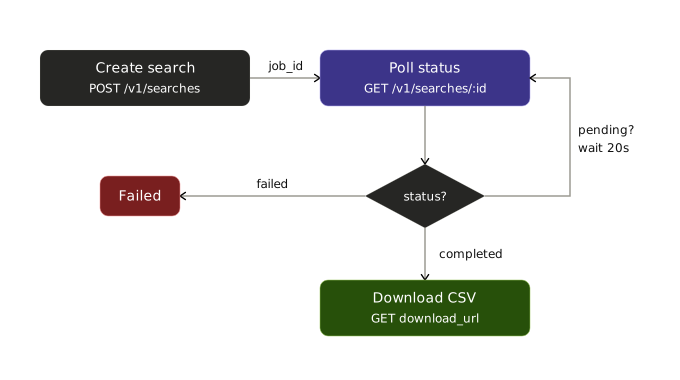
The API follows a three-step asynchronous pattern:
- Submit a search —
POST /v1/searches - Poll for completion —
GET /v1/searches/{job_id} - Download results — the pre-signed URLs returned by the status endpoint
All responses are JSON; results are delivered as one or more Snappy-compressed Parquet files (large result sets are sharded, since each shard is capped at 1 GB). See the Reimbursement Data Schema for column definitions. Every non-2xx response follows the standard error envelope.
Quick Start
Get from zero to your first successful request in a few minutes.
1. Register for an account
The Keeper Health API is a paid product. To request access, email company@keeperhealth.com with a short description of your use case and expected request volume. Our team will set up your account and respond with next steps.
2. Get your API key
After your account is provisioned, our team will email you a developer API key directly. Treat this key like a password — store it in a secrets manager or environment variable, and never commit it to source control. See Authentication for header format, rotation, and security best practices.
To rotate or replace a key, email company@keeperhealth.com.
export KEEPER_API_KEY="your_api_key_here"3. Make your first request
Copy and paste the snippet below to submit a search for a single provider and billing code. This is the "Hello World" of the Keeper Health API — pick your language with the tabs.
curl -X POST https://api.keeperhealth.com/v1/searches \
  -H "Authorization: Bearer $KEEPER_API_KEY" \
  -H "Content-Type: application/json" \
  -d '{
    "npis": [1144218512],
    "billing_codes": ["99213"],
    "fee_schedules": [{"payer": "Cigna", "plan": "PPO"}]
  }'
You'll receive a job_id in the response. Poll GET /v1/searches/{job_id} until status is completed, then download each URL in the pre-signed download_urls array to retrieve your Parquet shards. See the Quickstart for the full three-step workflow, or Code Examples for complete end-to-end clients in four languages.
Pricing & Quotas
Pricing is based on search volume and is tailored to each customer's use case. There is a fixed cost for API access with associated quota. — email company@keeperhealth.com for a quote.
If your workload requires higher limits than your current plan allows, contact company@keeperhealth.com to discuss a quota adjustment.
Rate limits. API requests are rate-limited per API key. If you exceed the limit, the API returns a 429 status code. Implement exponential backoff in your polling logic to stay within limits. See Rate Limits for numeric limits, recommended polling cadence, and backoff guidance.